
SIGMASK PRO
</>
LEGAL DISCLAIMER
PLEASE READ!
I, the creator and all those associated with the development and production of this program are not responsible for any actions and/or damages caused by this software. You bear the full responsibility of your actions and acknowledge that this software was created for educational purposes only.
This software’s intended purpose is NOT to be used maliciously, or on any system that you do not own or do not have explicit permission to operate on. By using this software, you automatically agree to the above.
root@eagle:~# VIDEO DEMO _
LIVE DEMO
.
sigmask
SIGMASK PRO
PE signature
Quick Start
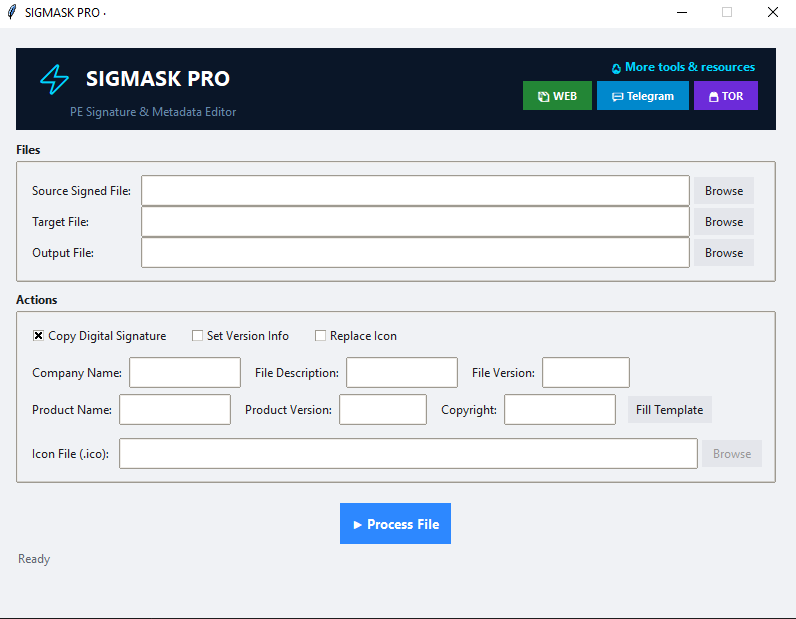
1. Load signed file → source of signature
2. Load target file → file to modify
3. Select actions → copy signature / edit metadata / replace icon
4. Process → output modified file
2. Load target file → file to modify
3. Select actions → copy signature / edit metadata / replace icon
4. Process → output modified file
Functionality
- → copy digital signature from signed PE → unsigned PE
- → modify version info: CompanyName, FileDescription, FileVersion, ProductName, ProductVersion, LegalCopyright
- → replace icon resource with custom .ico
- → supports .exe, .dll, .sys (PE32/PE32+)
Field Reference
SOURCE SIGNED FILE
Path to file with valid digital signature (Authenticode).
Example: C:\Windows\System32\notepad.exe
Format: .exe, .dll, .sys
Required for: signature copy operation
Example: C:\Windows\System32\notepad.exe
Format: .exe, .dll, .sys
Required for: signature copy operation
TARGET FILE
File to modify. Will be read and written with changes.
Example: C:\tools\myapp.exe
Format: .exe, .dll, .sys
Required for: all operations
Example: C:\tools\myapp.exe
Format: .exe, .dll, .sys
Required for: all operations
OUTPUT FILE
Destination path for modified file. If empty, auto-generates with _signed suffix.
Example: C:\tools\myapp_signed.exe
Note: Original target file is not modified
Example: C:\tools\myapp_signed.exe
Note: Original target file is not modified
ACTIONS
[✓] Copy Digital Signature — duplicates certificate from source to target
[ ] Set Version Info — writes custom metadata to target
[ ] Replace Icon — embeds .ico file into target resources
[ ] Set Version Info — writes custom metadata to target
[ ] Replace Icon — embeds .ico file into target resources
Use Cases
1. Bypass “unsigned driver” warning
Source: signed_driver.sys → Target: custom_driver.sys
Action: Copy Digital Signature only → Result: driver loads without warning
Action: Copy Digital Signature only → Result: driver loads without warning
2. Brand internal tools
Target: internal_tool.exe
Actions: Set Version Info + Replace Icon
Result: tool shows company name, version, custom icon
Actions: Set Version Info + Replace Icon
Result: tool shows company name, version, custom icon
3. Test environment setup
Source: prod_app.exe → Target: test_app.exe
Action: Copy Signature + Set Version Info
Result: test environment mimics production attributes
Action: Copy Signature + Set Version Info
Result: test environment mimics production attributes
4. Signature research
Extract and analyze certificate structures from various signed files
Study how Windows validates Authenticode signatures
Study how Windows validates Authenticode signatures
Version Info Fields
CompanyName
Organization name
Organization name
FileDescription
Application description
Application description
FileVersion
Version string (e.g., 1.0.0.0)
Version string (e.g., 1.0.0.0)
ProductName
Product identifier
Product identifier
ProductVersion
Product version string
Product version string
LegalCopyright
Copyright notice
Copyright notice
Download
For research & testing only. Use on files you own.